
Apps That Make Your Face Symmetrical
Choose the output before choosing the app. This guide compares published information about landmark tests, mirrored portraits, flips and photo measurements, including privacy and payment considerations. It reviews public descriptions rather than ranking hands-on accuracy.
Which kind of tool do you need?
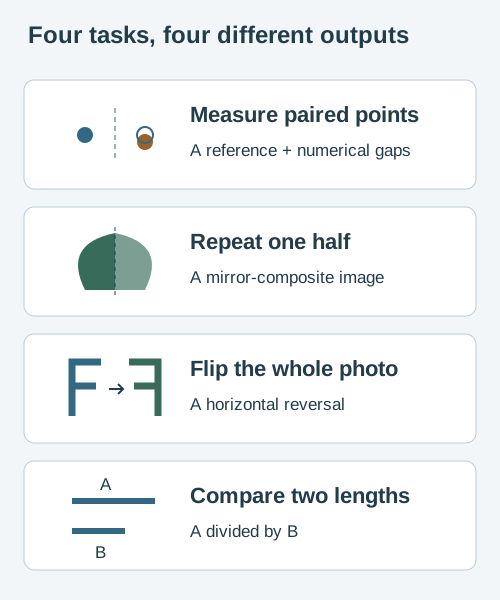
“Check my symmetry” can mean four different actions. Choosing the output first avoids paying for a report when you only wanted a flipped photo.
- Inspect a visible difference. Look for named landmark pairs, a visible reference line and the original image alongside the result.
- Make a left-left or right-right portrait. Look for a mirror-composite generator with a line you can position. It creates an edited face.
- See the opposite orientation. A horizontal flip is enough. It swaps image left and right without duplicating a half.
- Measure a particular relationship. Choose a calculator that defines its endpoints and denominator. A length ratio is a separate question from bilateral symmetry.
Face symmetry apps and browser tools compared
The examples below cover browser analysis, browser composites and native iPhone or Android apps. They are ordered by type, not quality. Vendor descriptions establish what is advertised; they do not independently verify accuracy, privacy implementation or performance.
| Tool and platform | Published output | What to check |
|---|---|---|
| Face Symmetry CheckerBrowser · this website | 16 reflected landmark pairs, six region summaries, raw mismatch and a photo index. Separate flip, composite, manual measurement and two-photo tools. | Our code processes selected photos in the browser. Read the privacy page for website requests and the formula and limits. The index has no established clinical normal range. |
| FaceSymAI / Face Symmetry TestBrowser · landmark analysis | Its page describes a 68-point model and seven feature-pair scores combined into an overall number. | The page says images are processed in memory and not retained. Its privacy policy also describes hosting logs, analytics and advertising. Do not interpret image deletion as an absence of all website data processing. |
| PicHacksBrowser · mirrored portraits | Its instructions ask for a forward-facing photo and a manually positioned midline to explore symmetrical versions. | Use it as a composite-image experiment. The welcome page reviewed does not establish a calibrated landmark score or explain photo retention. Resolve photo-handling questions before supplying a personal image. |
| Face Symmetry:nobody’s perfectiPhone / iPad · App Store listing | The developer describes left/right mirrored portraits, alignment controls, saving and sharing. The listing shows in-app purchases. | This is a composite workflow, rather than evidence of a validated measurement. The App Privacy section lists tracking categories including identifiers and usage data. Check current device compatibility, permissions and the exact purchase before installing. |
| SymFace – Face Symmetry TestAndroid · Google Play listing | The developer describes an overall score, five facial areas, mirrored halves and a local history. The listing says photo and landmark processing occurs on-device. | The listing contains ads and says device or other IDs may be shared. The developer policy describes advertising and analytics services. Local image analysis does not imply no other data processing. Grades remain that product’s scale. |
Landmark count is not an accuracy ranking. A model can estimate many points while a score uses only a subset; different references, pairs and weights can produce different numbers. Our 16-pair mean is one disclosed choice, not proof that this site is more accurate than another app.
A useful choice is specific
“I want to see why one photo looks different.”
Start with the original, its horizontal flip and a clear orientation label. If you want two repeated-half portraits, use a manually aligned mirror generator. Neither shows every view that other people see.
“I want to inspect an uneven feature.”
Choose a tool that shows the points and reference used for that feature. Our manual eye tool and jaw tool use different references. Read their definitions before treating two percentages as the same measurement.
“I want to compare two existing photos.”
Keep one method and similar capture conditions. Our comparison tool reports the difference in normalized photo mismatch. It cannot tell whether a difference came from anatomy, expression, pose or estimated points.
If your goal is a care decision about a changing feature, symptoms or function, an app comparison is the wrong starting point. The facial-asymmetry guide explains how to describe the concern and when to seek appropriate help.
What does “private” mean for a face app?
Separate three questions: Where is the image analyzed? What remains afterward? What other information does the website or app process? A photo can stay on your phone while an advertising component still communicates with a service. Equally, an image processed temporarily on a server is different from one stored in a permanent account history.

Apple explains that App Store privacy information is self-reported by developers. Read the full policy as well as the label. Google’s Data safety guidance also explains developer disclosures and exceptions: some data processed ephemerally off-device need not be declared as collected. “No data collected” alone therefore does not establish that an image never leaves the device.
WebAssembly can run a model locally, but its presence alone does not prove that a page makes no network requests. Here, the selected-photo analysis is implemented locally; the website still has to deliver pages and model assets. Read our current privacy information for the wider context.
Check whether saved photos, numerical histories and exported reports need separate deletion. Sending a result card to a social platform creates another copy under that platform’s controls. Use images you have permission to use, and try a clearly fictional sample before a personal portrait when one is offered.
Before you install, upload or pay
Tick the questions you have answered. This is a personal checklist: it does not choose an app, assign a score or submit your answers.
How to assess a tool without chasing a score
- Read one result carefully. Can you identify the output, units and reference? A result called “97” needs an explanation before it is useful.
- Inspect the original. For a measurement, check whether the estimated points fit the visible features. For a composite, move the midline and notice that the edited result changes.
- Check the controls you need. Try a sample, keyboard navigation, orientation labels and clear/reset. A tool should be understandable before you give it a personal photograph.
- Keep the question bounded. Use the output to explore that image. Matching results across apps would not independently validate anatomy, and disagreement would not tell you which one is correct.
For comparisons, do not average scores from different products. Even two scores out of 100 can summarize different quantities. Read what this site’s index means and why another photograph changes the result.
Common questions about face symmetry apps
Which face symmetry app is the most accurate?
This comparison does not establish an accuracy winner. That would require a suitable reference method, defined outcomes and a disclosed test across relevant images and users. Clear arithmetic and a visible overlay make an output easier to inspect; they do not establish anatomical accuracy by themselves.
Is a free browser tool enough?
For a simple horizontal flip or a repeated-half image, a browser tool may provide the output you need without an app installation. Check supported files, export options and local processing. For any paid report, read what is unlocked before paying; a more detailed report is not automatically a more valid one.
Are iPhone and Android apps better than websites?
The platform alone does not answer that. A native app may offer an on-device history or an offline workflow; a website may offer immediate access without installation. Review the specific version, output, permissions and device requirements rather than assuming all apps or all websites behave alike.
Why do two apps give different symmetry scores?
They may use different points, midlines, normalization, weights or score transformations. Even the same image can be interpreted differently by different detectors. Keep comparisons within one disclosed method, inspect the points and avoid translating a score from one app into another app’s scale.
Can a mirror app show how I would look after treatment?
No. A mirror composite copies pixels from one half to the other. It does not model tissue movement, healing or treatment feasibility. Use it as an image experiment, and keep medical or dental decisions separate from an edited portrait.
How this comparison was prepared
We checked the linked public product pages, US English store listings and privacy documents on . Searches and public discussions helped identify questions about mirror effects, conflicting scores and photo permissions; they were not used as proof of a product’s accuracy or misconduct. This is a selected set of examples, not a complete market survey.
We did not upload portraits to third-party services, inspect their network behavior, test subscriptions or verify advertised on-device processing. Our own workflow descriptions were checked against this website’s code. Country, version and device requirements can differ, and policies or purchases can change after this review. We omit star ratings and exact prices because neither answers the measurement question and both require current local context. Our editorial policy explains how we handle evidence and corrections.
Sources and method references
- FaceSymAI product description and privacy policy.
- PicHacks instructions.
- Face Symmetry:nobody’s perfect - App Store listing and App Privacy section.
- SymFace - Google Play listing and Data safety section and Cooltime Studio privacy policy.
- Apple: About privacy information on the App Store.
- Google Play: Understand app privacy and security practices.
- Our measurement definitions and validation limits; our privacy information.
All diagrams are original conceptual illustrations. They are not screenshots, actual face measurements or independent product certifications. Report an outdated claim through our contact page.