
Expression
Which expression fits your brief? Compare eye contact and the feeling of the smile before studying small differences between the cheeks.
Your preferred portrait angle can change with the light, expression and purpose of the picture. Compare two real photographs side by side, choose the version you prefer and save the pair with your own labels.
Add a portrait from this angle.
Add a portrait from this angle.
Judge the pair by the expression and lighting you prefer. This choice is yours; no face rating is calculated.
Preview and save it only when you choose. The exported file contains both photos.
Start with a purpose: a profile portrait, a makeup reference or a camera-angle experiment. For a profile, expression and a clear crop may matter most. For a makeup reference, visible detail and consistent light may be more useful.
This finder puts two supplied photographs together and records your choice. It does not turn one half of your face into a new face, detect a dominant side or measure facial symmetry. A more symmetrical-looking photo does not automatically answer which portrait you prefer.
Change the direction of your head while keeping the rest of the setup as steady as you can. A handheld close selfie on one side and a distant portrait on the other test several things at once.
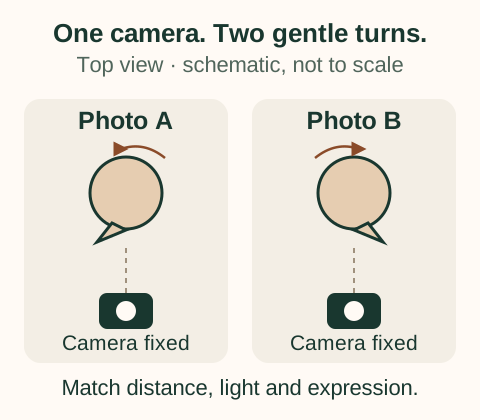
Keep camera distance fixed. Ward et al.’s 2018 perspective model shows why short camera distances can enlarge the apparent nose relative to facial width. Cropping a more distant photograph changes framing without recreating that close viewpoint. Read our selfie perspective guide for the distinction.
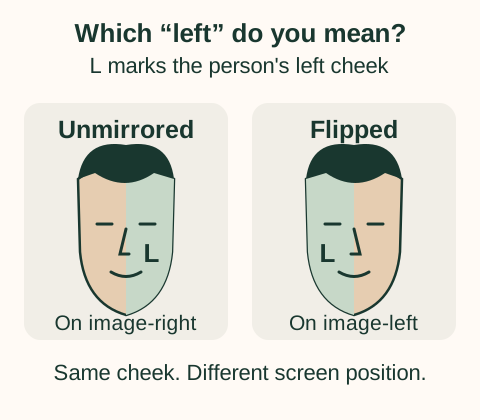
“Left” can mean your anatomical left or the left of the displayed image. In an ordinary unmirrored, front-facing portrait, your left cheek appears on the viewer’s right. A horizontal flip moves it to the viewer’s left.
Check the saved photo rather than relying on the camera preview; the two may use different mirror settings. A recognizable earring or another known detail can help. If you are unsure, label the images “Angle A” and “Angle B” instead of guessing.
The finder displays the supplied image orientation. It does not identify anatomical sides or automatically reverse a photo. Use the inverted filter to explore a horizontal flip separately.
View the photos at a similar head size, then use a few practical questions. The aim is to choose a usable photograph, not to find a fault in every feature.
Which expression fits your brief? Compare eye contact and the feeling of the smile before studying small differences between the cheeks.
Can you see the detail you need? Check for glare, lost shadow detail or a nose shadow that changes the impression of a feature.
Try the intended display size. Hair, shoulder direction and empty space can make one portrait work better in a circular profile crop.
Add a short label to each image, select the purpose, then choose Photo A, Photo B or Both / no preference. “Both” is useful when the two pictures serve the same brief equally well. If one photo is blurry or differently framed, improve the pair before interpreting your choice.
“I prefer Angle B for this profile because the eyes are clear and the expression feels relaxed.” That gives you something to repeat at the next shoot without assigning a permanent good or bad side.
After the even-light pair, try a second experiment: keep your preferred pose and move the main light. Profoto’s portrait-lighting demonstration distinguishes broad and short lighting by which visible side receives the main light.
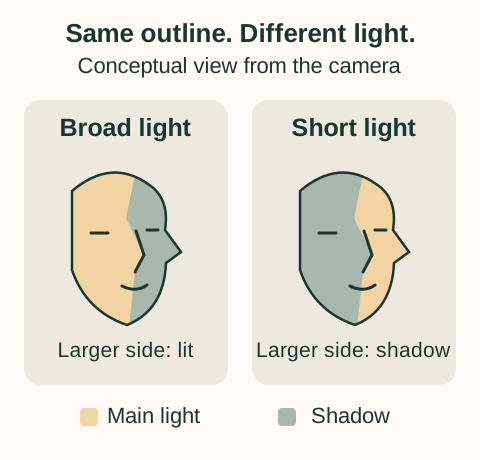
The larger cheek area visible to the camera receives the main light. More of that visible surface is illuminated.
The smaller, farther side receives the main light; the larger camera-facing area is more shadowed. This creates a different balance of light and dark.
Neither pattern is a rule for your face shape. Pick the mood and detail you want. Keep pose, distance and expression steady so this pair primarily tests lighting.
Hair parting, glasses reflections and clothing can also change a portrait. Test one of those next if it matters to the final image. Record what changed in the labels; otherwise, a remembered “better side” can become a mixture of several different conditions.
Studies have found left-cheek posing biases in particular samples. That is different from establishing that everyone’s left side is more attractive.
Nicholls et al. (1999) examined portrait orientation and asked participants to pose with different intentions. Posing shifted with instructions to express or conceal emotion. The authors proposed an emotional-expression explanation; this was not a universal beauty test or a rule about which cheek to photograph.
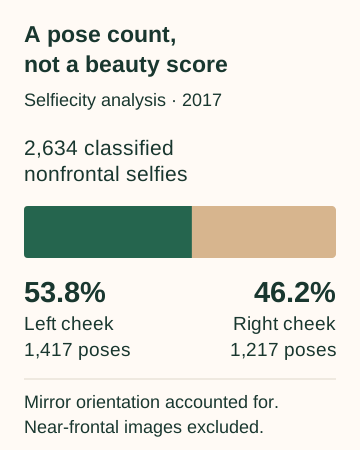
A 2017 selfiecity analysis reported 1,417 left-cheek poses among 2,634 selfies classified as nonfrontal, accounting for mirror selfies. That is 53.8% of that analyzed subset. Near-frontal images were excluded from this left-versus-right comparison. It describes posing choices, not an attractiveness score.
Lindell’s separate 2017 study examined ten Instagram selfies each from 200 people and found individual preferences for left, right and midline poses. Your own photo brief remains a better basis for this choice than a population average.
Choose JPG, PNG or WebP files up to 20 MB each; images over 50 megapixels are rejected. Photos are processed in this browser. The working preview is resized to a maximum 1,600-pixel edge while preserving proportions.
Save comparison PNG prepares a 1,500 × 1,050 image; Save 9:16 comparison prepares 1,080 × 1,920. Both include the two photos, their labels, the selected purpose and your preference. Preview the result, then use Download PNG. You can also export without selecting a winner.
Keep one useful note, such as “window near camera, same distance, relaxed smile.” Clear both photos when finished. Clearing removes the active comparison; it does not delete copies you already downloaded.
No. You choose a preference from two real photos. There is no facial attractiveness model, automatic side detection or mathematical winner. The purpose and photo labels make your choice useful to repeat.
Use actual portrait angles for this task. A composite duplicates one half, including its light and expression, and creates a new image. For that visual experiment, use mirror face analysis.
Check what changed: camera position, light direction, expression, hair, framing or mirroring. A preference applies to the supplied pair. Try a matched pair before deciding that one particular feature caused the difference.
No, but match the conditions relevant to your question. When comparing poses, hold the camera and light steady. When comparing lighting, hold the pose steady. The tool does not correct differences between the two source photographs.
For two near-frontal portraits, the face symmetry comparison uses its disclosed landmark method and pose checks. It measures selected image relationships; those measurements do not decide which portrait you should prefer.
Research and tool instructions checked October 20, 2026. The four diagrams are original explanatory illustrations. No clinical review or personal portrait assessment is claimed.
Read our privacy information and tool methods. Report unclear instructions through our contact page.