
Golden Ratio Face Calculator
Measure two distances in a photo, or enter lengths you already have, to compare A ÷ B with the golden ratio, φ ≈ 1.618. For example, 160 ÷ 100 = 1.600, about 1.115% below φ. Photo mode uses four points you place yourself; the result describes those measurements and their mathematical difference from φ.
Measure A and B from a photo
Choose a photo or the fictional sample, select a measurement and place A1, A2, B1 and B2. Then choose Use these lengths below to copy the calculated pixel lengths into the number form. The photo and points stay in this page; no automatic landmark detection is used.
Measure the distances you choose.
Choose a photo to begin.
Your photo. Your reference points.
Choose a front-facing photo, then mark the two ends of each distance.
JPG, PNG or WebP · Up to 20 MB · Nothing leaves your browser.
Click or tap to place the selected point. With the photo focused, arrow keys move the crosshair; Shift moves it faster. Enter or Space places a point. You can also enter coordinates below.
Place four reference points
Enter exact point coordinates
Percentages run from the image-left edge (x = 0%) and top edge (y = 0%).
No points are detected automatically. You choose all four.
Face height / face width
Place all four points to calculate the ratio.
φ ≈ 1.618. This is a mathematical constant, not a validated ideal for faces. A closer ratio does not imply greater attractiveness.
Most ratios show two decimals; very small or large ratios use scientific notation. The JSON keeps the computed value. Lengths are pixels in the working image. A / B compares two distances within this photo; it is not an anatomical measurement or beauty score. Angle, expression and point placement affect the result.
Your measurement JSON is ready.
If saving is blocked, open the file and use your browser’s Save option. Editing a measurement clears this prepared file.
After changing points, copy the lengths again. Changing the photo measurement clears a calculation still linked to it, including swapped copied lengths. Numbers you edit yourself and worked examples are independent. Closing this panel keeps your work available; use Clear photo to remove the image from this page.
Compare two measurements
Enter two lengths in the same unit, or copy them from photo mode above. Keep your chosen numerator in A and denominator in B. The comparison uses the entered A/B and shows its signed difference from φ.
The main comparison always uses A/B versus φ. Swapping the inputs changes the order; it does not change that reference. No result is converted into a beauty percentage.
Save the measurement and the comparison together
Two files answer different questions. The photo workspace records what you measured; the calculation file records how those lengths compare with φ. Neither contains the photograph.

Photo measurement JSON
Use Download measurement JSON inside photo mode. It includes the selected preset, labels, four endpoint definitions and coordinates, image dimensions, lengths and ratio. The file omits the photo and original filename.
Calculation JSON
Use Prepare calculation JSON below the number form. It includes A, B, A/B, φ, signed differences and the reversed ratio. Transferred inputs record working-image pixel units; manually entered units and endpoint names need your own note.
Which Clear button should I use?
Clear in the number form removes its values and prepared file link. Clear photo removes the image, points and photo export; it also clears a calculation still linked to those points, even after swapping A and B. Numbers you edit yourself and worked examples remain in the form until you clear them there. Files already saved on your device remain there.
Three numbers, three different meanings
For A = 160 and B = 100, the arithmetic below is the whole comparison. The signs tell you which side of the reference the ratio lies on.
A is 1.6 times B. This number has no unit because the length units cancel.
The ratio is below φ. A plus sign would mean above φ. This difference is in ratio units.
The difference is about 1.115% of φ. It is not an accuracy, attractiveness or symmetry score.
What if the order is reversed?
100 ÷ 160 = 0.625. Neither division is a mistake; they answer inverse questions. If you reverse a comparison with φ, reverse the reference too: 1/φ ≈ 0.618034. Do not compare width/height from one source with height/width from another.
To describe distance alone, take the absolute value: |r − φ|. This page keeps a signed difference so the direction stays visible. More decimal places do not make the original measurement more precise.
A facial ratio starts with an endpoint definition
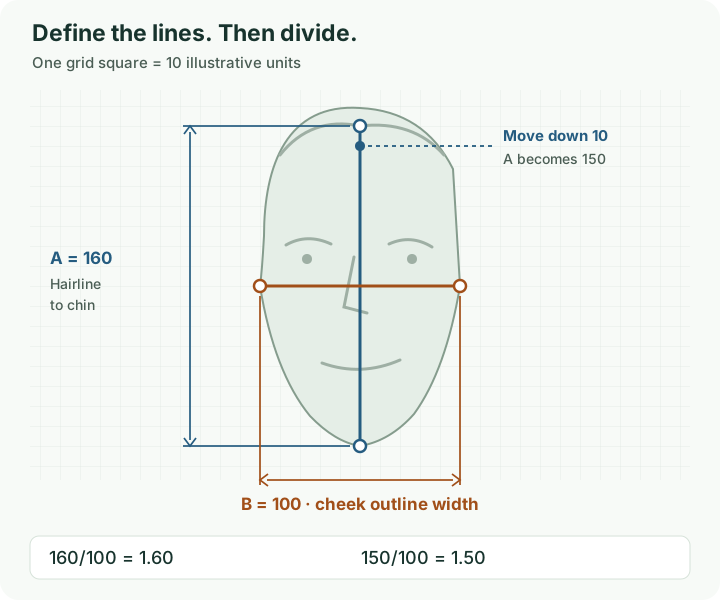
“Face length” is incomplete unless you say where it begins and ends. A visible hairline-to-chin measurement differs from eyebrow-to-chin height. Both can be measured; they cannot be treated as the same variable.
Choose one question at a time
| Question | A ÷ B |
|---|---|
| Visible face height relative to width | Hairline midpoint to chin ÷ widest selected cheek outline |
| Mouth width relative to nose width | Lip corner to lip corner ÷ outer nose wing to outer nose wing |
| Eye spacing relative to face width | Chosen iris-center spacing ÷ selected cheek outline width |
These are measurement examples, not a list of proportions that should equal φ. Hair, expression, pose and the chosen outline can make point placement uncertain.
Keep a tiny measurement note
Record the photo, the four endpoints, A, B, the unit and the order. For instance: “Same frontal photo; visible hairline midpoint to chin / cheek outline width; 320 px / 200 px; ratio 1.60.” This is more useful than saving a number with no definition.
What cancels out, and what still changes?
Uniform scale cancels out
160 mm / 100 mm, 16 cm / 10 cm and 320 px / 200 px all equal 1.60. Multiplying both lengths by the same positive factor k leaves (kA)/(kB) = A/B.
Mixing units breaks that shortcut. If A is 16 cm and B is 100 mm, first convert A to 160 mm. Entering 16 and 100 directly gives 0.16, a different calculation.
Perspective and point choice remain
Exactly uniform resizing preserves a ratio; stretching width and height differently may not. This photo tool limits the longest side to 1,600 px and rounds each working dimension to a whole pixel. That rounding can slightly change the scale relationship; its readout and JSON describe the working image. Resizing also does not undo a close camera’s perspective. Ward et al.’s 2018 projection model shows how camera distance can change apparent nasal proportions.
For repeated photo measurements, keep camera distance, head direction and expression similar. Explore selfie perspective before interpreting a change as a change in your face.
A small endpoint change can matter more than extra decimals
In the schematic, A = 160 and B = 100 give 1.60. Move the top endpoint down 10 units: 150/100 = 1.50. Keep A at 160 but widen B to 105: 160/105 ≈ 1.524. The equation stays correct while the measurement definition changes.
For a practical check, place the points again without copying the first selection and note both ratios. A difference describes that repeat attempt; it does not establish a clinical error rate or a confidence interval.
Could plausible placement changes cross φ?
Suppose your measured lengths are A = 160 px and B = 100 px. To explore sensitivity, choose an illustrative allowance of 2 px on each length: A could be 158–162 and B could be 98–102. These are assumed bounds for this exercise, rather than an estimate of this tool’s error.

Use opposite bounds for the extremes
For positive lengths, A/B increases as A increases and decreases as B increases. The smallest possible ratio here is 158/102 ≈ 1.549; the largest is 162/98 ≈ 1.653. Pairing both smaller lengths, 158/98, would miss the minimum.
In general, if A lies in [Amin, Amax] and B lies in [Bmin, Bmax] with Bmin > 0, the ratio lies within [Amin/Bmax, Amax/Bmin]. Shared endpoints may restrict which combinations are physically possible; these bounds can then be conservative.
Try it with the actual form
- Try 160 ÷ 100 above and read the negative difference.
- Enter 158 and 102, then 162 and 98.
- Watch the signed difference change from below φ to above it.
The exercise shows why the sign of a small difference should not carry more meaning than your endpoint definition supports. The form calculates one pair at a time; it does not estimate uncertainty from your photo.
Where does 1.618 come from?
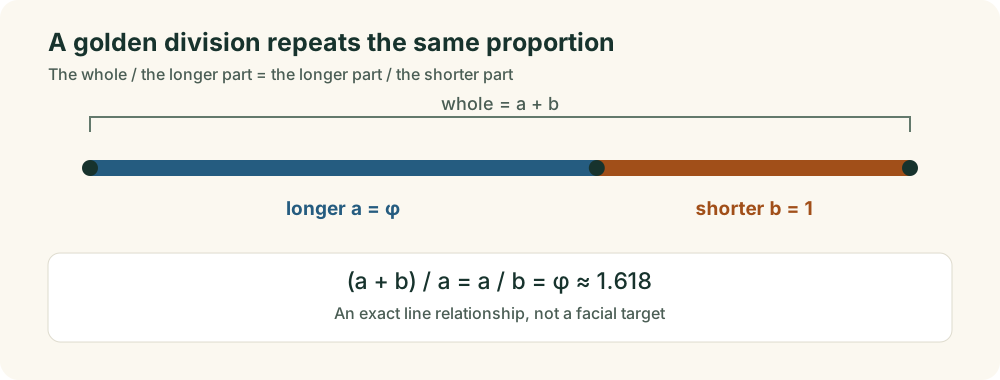
The golden ratio describes a particular way to divide a line: the whole compared with its longer part equals the longer part compared with its shorter part. This is Euclid’s extreme and mean ratio.
From a line to an equation
Let r = a/b. For a golden division, (a + b)/a = a/b, so 1 + 1/r = r. Multiplying by r gives r² − r − 1 = 0. Its positive solution is (1 + √5)/2 ≈ 1.6180339887.
1.618 is rounded. The calculator uses (1 + Math.sqrt(5))/2 at the browser’s floating-point precision. A displayed difference of 0.000 can therefore mean a very small difference rounded for reading.
Do not combine two different formulas
A/B asks about two chosen lengths. (A + B)/A asks about their sum compared with A. They coincide only for a golden division. For A = 160 and B = 100, they are 1.600 and 1.625, respectively.
You do not divide those two results to obtain a facial rating. Similarly, 1.618 is not a score out of 10, and a third-party score cannot be converted back to a ratio without its published equation.
Does a ratio near φ mean a more attractive face?
A small numerical difference establishes closeness to a constant for this pair of lengths. This calculator has no validated rule that translates that difference into attractiveness.
Pallett, Link and Lee’s experiments (2010) varied eye-to-mouth distance and eye spacing in photographs of Caucasian women. Their reported proportions, roughly 0.36 and 0.46 for those definitions, were not φ. The findings concern judgments of the manipulated images in that study, rather than a universal target for every face.
Holland’s 2008 analysis of Marquardt’s phi mask also questioned the mask’s fit and generalization. A geometric overlay cannot establish a universal facial ideal. For the fuller evidence discussion, read the golden ratio face myth guide.
When the numbers need context
Can I use a photo in this golden ratio calculator?
Yes. Open Measure A and B from a photo near the top, choose an image, place four endpoints and select Use these lengths below. This copies the measured working-image pixel lengths into the number form on this page. All points are manual; the photo mode does not detect a face automatically.
Which facial measurement should equal 1.618?
This tool does not prescribe one. You choose the distances and compare their ratio with a mathematical constant. Face height/width, mouth/nose width and eye spacing/face width have different definitions; they are not interchangeable tests of one ideal.
Why does another website give me a different result?
Check whether it measures the same endpoints, keeps the same numerator and denominator, uses the same photo and shows a raw ratio or a transformed score. A hairline-to-chin ratio and an eyebrow-to-chin ratio can differ even when both calculations are correct.
Can I use pixels instead of millimeters?
Yes, for two lengths in the same image coordinate system. Uniform scale cancels in A/B. Pixels do not become anatomical millimeters without calibration, and a ratio from a photo still reflects perspective and your point choices.
What does a negative percentage mean?
The signed relative difference is 100 × (A/B − φ) / φ. A negative value means your selected ratio is below φ. A positive value means above. Neither sign is a judgment about your appearance, and the percentage is not a symmetry score.
Does this calculate facial symmetry or a beauty score?
A ratio compares the sizes of two distances. Facial symmetry compares corresponding locations on the two sides of a face. This calculator performs the first task and does not generate a beauty rating. See the facial symmetry guide for the distinction.
Why will it not accept zero or an enormous number?
A zero denominator makes division undefined; a zero length is not useful for this measurement. Both entries must be positive and at most 100,000. Extremely unequal values may also exceed the browser’s finite numerical range. Convert both lengths to the same larger unit to reduce their numeric values if needed. This does not change the ratio or resolve an extremely unequal pair.
What is in the calculation JSON?
It records the entered A and B, computed comparison, method information and time of creation. A photo transfer records working-image pixel units. Manually entered units are not recorded, and this file does not include endpoint definitions. Save the photo workspace’s separate measurement JSON if you need its selected point coordinates, labels and image dimensions. Neither JSON contains the photograph.
Sources and calculation notes
Research and workflow checked November 5, 2026. Published by Face Symmetry Checker; Aron is the public site contact. Original diagrams explain the actual workflow, chosen measurements and arithmetic. The assumed 2 px length bounds are an illustration, without clinical or device validation. Source checking and software checks do not constitute independent clinical review.
- Euclid, Elements, Book VI, Definition 3 - the primary geometric definition, hosted by Clark University.
- Pallett PM, Link S, Lee K (2010). New “Golden” Ratios for Facial Beauty. Vision Research, 50, 149–154. - original experiments using defined feature-spacing ratios.
- Holland E (2008). Marquardt’s Phi Mask: Pitfalls of Relying on Fashion Models and the Golden Ratio to Describe a Beautiful Face. - original analysis of mask fit and its interpretation.
- Ward B et al. (2018). Nasal Distortion in Short-Distance Photographs: The Selfie Effect. - the authors’ paper describing a projection model of apparent nasal breadth relative to facial breadth.
For the wider photo-analysis method, read our methodology. Report an unclear definition or calculation problem through the contact page.